01
Coming soon
Tutorialvideos
Short step-by-step videos that show you exactly where to click. Start with the dashboard tour, then follow the tutorials in order. New tutorials appear here as soon as they are ready.
Start here, 12 minutes
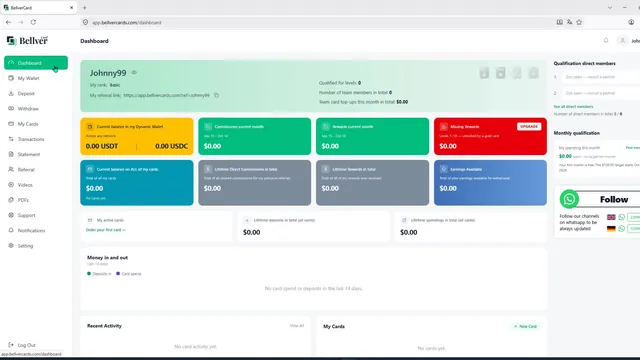
Dashboard walkthrough
Watch this once after you register and you will know where everything is in your back office.
 11:53
11:53What each coloured field means
Yellow: wallet balanceYour USDT and USDC balance in your dynamic wallet. Other coins are not shown here. You pay for cards from this balance.
Green: this month's earningsDirect commissions and rewards earned in the current billing month.
Red: missed rewardsRewards you did not receive because you were not qualified in time. Ideally always zero.
Blue: card balanceThe money currently on your card, or on all your cards combined.
Grey: lifetime totalsEverything you have ever earned in commissions and rewards.
Dark blue: earnings availableOnce a month the green fields move here, ready to withdraw. Payout day is the 15th.
Menu by menu
My Wallet: your Fireblocks wallet. Swap currencies, send funds, set a transaction password and export your private key under Settings, then Account and security.
Deposit: fund with crypto (USDT or USDC recommended, plus BNB or TRX for gas), credit card, or SEPA and PayPal in Europe. A calculator shows how much you need.
Withdraw: request payouts of $100 or more. They show as pending, then appear in My Wallet.
My Cards: order cards and see each card's balance and transactions. When your card appears you get the next free place in the 2x2 matrix.
Referral: your matrix, direct referrals, people per level, card levels and ranks in your team, including spillover.
Settings: switch on two-factor authentication. Bellver strongly recommends it.
Step-by-step tutorials
Follow them in order, from your first sign-up to your first payout. Each one matches a step in the written setup guide.
02
Coming soon
Secure your account
Two-factor login, a transaction password and saving your private key.
Read the written steps03
Coming soon
Deposit USDT or USDC
Send stablecoins on BNB Smart Chain, plus a little BNB for gas.
Read the written steps04
Coming soon
No crypto yet? Buy with a card
Use Buy crypto in the dashboard to fund your wallet.
Read the written steps05
Coming soon
Order your virtual card
Choose your level and options, then pay from your wallet.
Read the written steps06
Coming soon
07
Coming soon
Add it to Apple Pay or Google Pay
Pay with your phone anywhere contactless is accepted.
Read the written steps08
Coming soon
09
Coming soon

Need a tutorial that is not here?
Tell me what you are stuck on and I will make a video for it, or walk you through it on WhatsApp.